 Photo Print
How to print passport and ID photos at home from iPhone
Updated 3 October 2026
To print passport or ID photos at home from an iPhone, take the photo against a plain light background in even light, set it to the exact size your document needs (for example 2 × 2 in for a US passport, or 35 × 45 mm for a UK, EU or Indian passport), put several copies on one 4 × 6 in (10 × 15 cm) or A4 sheet, print at 100% scale on photo paper, and cut along the guides.
The iPhone’s Photos app cannot print at a physical size such as 2 × 2 in: it scales each photo to the paper. Photo Print: Size & Layout is an iPhone and iPad app that prints photos at exact sizes. Since version 1.3 it has the common passport and ID sizes built in, an ID photo setup for 4 × 6 paper, and a head-size guide in the crop editor.
Check the official rules before you print. Sizes and photo rules differ by country and by document (passport, visa, residence card, driving licence) and they change. Look up the current requirements on your government’s official website. Photo Print prints the size you choose exactly; it does not check background, expression, head size or any other rule, and cannot promise that a photo will be accepted.
Passport and ID photo sizes by country
These are the sizes built into Photo Print. Other sizes can be entered as a custom size in inches, centimetres or millimetres.
| Size | Inches | Millimetres | Commonly used for |
|---|---|---|---|
| 2 × 2 in | 2 × 2 | 51 × 51 | US passport and US visa; “2×2” ID photos (common in the Philippines and elsewhere) |
| 1 × 1 in | 1 × 1 | 25 × 25 | “1×1” ID photos, common in the Philippines for school, work and government forms |
| 35 × 45 mm | 1.38 × 1.77 | 35 × 45 | UK, EU and Schengen (e.g. Germany, France), India passport, Philippines passport, Australia and many other countries |
| 33 × 48 mm | 1.30 × 1.89 | 33 × 48 | China |
| 50 × 70 mm | 1.97 × 2.76 | 50 × 70 | Canada passport |
Size is only one rule. Most countries also set the head size within the photo, the background colour, and how recent the photo must be. Those rules are on your government’s passport or visa website.
How many passport photos fit on 4 × 6 or A4 paper
Counts below are what Photo Print’s ID photo setup makes: every photo upright, touching (no gap, so you cut once between neighbours), with cut guides. The app’s preview always shows the exact count for your paper and margin, and never shrinks a photo to fit another.
| Size | 4 × 6 in | A4 | US Letter |
|---|---|---|---|
| 2 × 2 in | 6 | 15 | 20 |
| 1 × 1 in | 24 | 77 | 80 |
| 35 × 45 mm | 6 | 30 | 25 |
| 33 × 48 mm | 9 | 25 | 30 |
| 50 × 70 mm | 4 | 12 | 12 |
Borderless printing (no margin) on 4 × 6 paper needs a printer that supports it. If yours doesn’t, the edges of the sheet may not print; add a margin of about 5 mm (fewer copies fit) or print on A4 or US Letter instead.
Steps: print passport photos from iPhone with Photo Print
- Take the photo. Stand in front of a plain white or light-coloured wall, facing a window or other soft, even light so there are no shadows on your face or the wall. Have someone else take it from about 1–1.5 m (3–5 ft) away at eye level, rather than a close-up selfie, which distorts the face. Use the rear camera if you can.
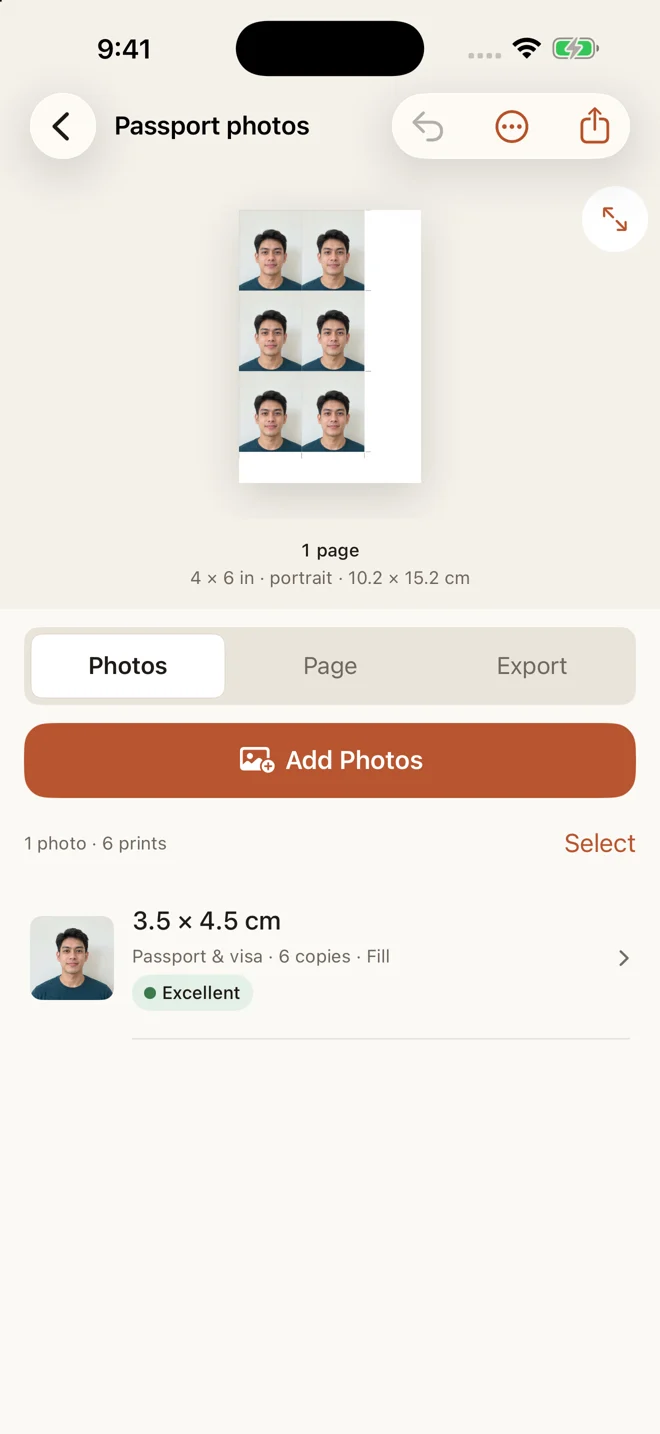
- Start an ID photo sheet. In Photo Print, tap ID photos on the home screen (or New Layout, then a size under ID & passport photos). Pick the size your document needs: 2 × 2 in, 1 × 1 in, 35 × 45 mm, 33 × 48 mm or 50 × 70 mm. The setup uses 4 × 6 in (10 × 15 cm) paper, crops each photo to fill its size, and draws cut guides.
- Add your photo. Choose one photo and the sheet fills with copies of it. If your document uses a size not listed, enter it as a custom size in inches, centimetres or millimetres instead.
- Adjust the crop. Open the crop editor, then move and zoom the photo so your face is centred. The head-size guide shows where the head sits in the frame; compare it with your country’s head-size rule, which the app does not check for you.
- Add copies. Add copies to fill the spare space on the sheet. The preview shows exactly how many fit. Photo Print never shrinks a photo to squeeze in another one.
- Check print quality. Each photo gets a quality rating from its pixels and its printed size. Any recent iPhone photo has far more pixels than a 2 × 2 in print needs; a low rating usually means a heavily zoomed crop or a small, compressed image.
- Print at true size. Print with AirPrint on 4 × 6 in glossy photo paper (or A4 / Letter), or save a PDF and print it at 100% / Actual Size, never “Fit to page”.
- Measure, then cut. Check one photo with a ruler before cutting the rest: a 2 × 2 in photo should measure 51 mm on each side, a 35 × 45 mm photo exactly 35 by 45 mm. Then cut along the guides with a paper trimmer or a craft knife and a metal ruler.
Tips for a usable passport photo
- Plain, light background. A white or off-white wall with nothing behind you. Some countries require pure white or light grey; check yours.
- Even light. Face a window in daylight. Avoid overhead lights and the camera flash, which cause shadows and glare.
- Neutral expression, eyes open, face straight to the camera. Many countries no longer allow glasses in passport photos; check yours.
- Print at 100%. Any “fit to page” or “scale” setting changes the size. See Photo printed the wrong size?
- Use photo paper. Glossy or matte photo paper, with the matching paper type chosen in the printer settings.
- Cut along the guides. A paper trimmer gives the straightest edges. Measure one photo before cutting the rest.
Frequently asked questions
Can I print a passport photo at home?
Many passport and visa applications accept photos you print yourself, as long as the photo meets every rule: size, background, lighting, expression, head size, how recent it is and the paper it is printed on. Some offices and online applications have their own requirements, such as a digital upload instead of a print. Check the official guidance for your document before you print.
What size is a US passport photo?
2 × 2 inches (51 × 51 mm). The same size is used for US visa photos. Check travel.state.gov for the current rules.
What size is a passport photo in the UK, EU, India or the Philippines?
35 × 45 mm (about 1.38 × 1.77 in) is used for UK, EU and Schengen-area passports and visas (including Germany and France), Indian passports, Philippine passports, Australia and many other countries. Confirm the current requirement on the official government site.
What is a 1×1 photo size?
1 × 1 inch, which is 25.4 × 25.4 mm (about 2.5 × 2.5 cm). In the Philippines, 1×1 and 2×2 photos are commonly asked for on school, employment and government forms.
How many 2×2 photos fit on a 4×6 sheet?
Six, in a 2 × 3 grid, when the photos touch each other and the printer prints borderless to the edges of the 4 × 6 in paper. Two 2 in photos are exactly 4 in wide, so any gap between them leaves room for only two photos. On A4 or US Letter with a ¼ in margin, fifteen fit with 3 mm gaps.
How many 35×45 mm photos fit on a 4×6 sheet?
Six, upright in two columns of three, touching, on borderless 4 × 6 in (10 × 15 cm) paper — that is what Photo Print’s ID photo setup makes from one photo. Thirty fit on A4 and 25 on US Letter with a ¼ in margin.
What paper should I print passport photos on?
Photo paper, not plain office paper. Glossy or matte photo paper both print well; some countries specify one or the other, so check the rules. Choose the photo paper type in your printer settings so the printer uses the right ink amount.
Does Photo Print make sure my photo will be accepted?
No. Photo Print prints the size you choose exactly and offers a head-size guide, but it does not check the background, lighting, expression, glasses, head size or any other official rule. Check your government’s current requirements and compare your photo with them.
Is Photo Print free?
Your first print or PDF export is free, and you can keep up to three layouts. Pro is a one-time in-app purchase that unlocks unlimited prints, PDF exports and layouts. There is no subscription and no account.
Get Photo Print: Size & Layout on the App Store
For iPhone and iPad. Your first print or PDF export is free, and you can keep up to three layouts. Pro is a one-time purchase for unlimited prints, exports and layouts. No account; photos stay on your device.
Related guides
- How to print a 4 × 6 photo at exact size from iPhone
- How to print multiple photos on one page (A4 or Letter)
- Photo printed the wrong size? How to fix it
For a specific size, follow the 2 × 2 inch photo guide or the 1 × 1 inch ID picture guide.
Written by Mohamed Elatabany, developer of Photo Print. App instructions are based on Photo Print; printer behaviour varies. Send a correction or ask for help.